Know where value was
Prior-session POC, VAH and VAL, naked POCs, previous day high and low, and VWAP with σ-bands. Drawn before the open.
- Regular-hours or full-session profiles
- Naked POCs carried forward until tested
Delta, footprint, session levels and key-level setups in one TradingView indicator. Built for NQ and ES traders.
Delta, reduced to what matters.
Ten modules share one engine. Turn on what you read, hide the rest, and keep the chart quiet until a level and the order flow agree.A signal in the middle of nowhere is noise. The same signal at yesterday's value-area low is information. The suite is built around that order of thinking.
Prior-session POC, VAH and VAL, naked POCs, previous day high and low, and VWAP with σ-bands. Drawn before the open.
Footprint bars with diagonal imbalances, cumulative delta, absorption that needs real one-sided delta, sweeps, trapped traders.
Key-level setups fire only when a trigger happens at a level that matters. The label tells you which trigger and which level.
This is the indicator as it looked on the day: prior-day levels, VWAP, profile, CVD and the dashboard. One label stood out.
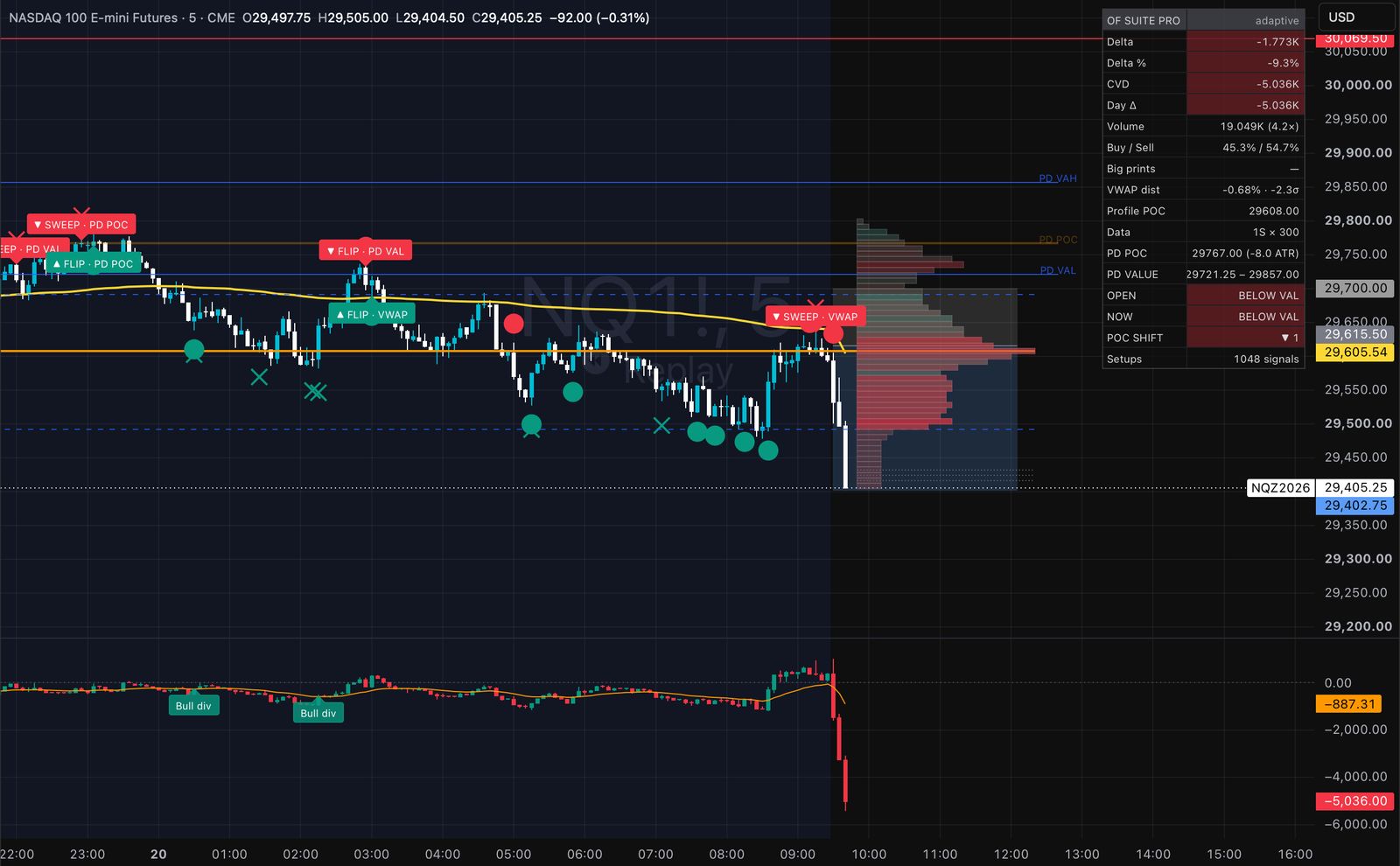
One example from one session. Many setups fail; this is how the tool reads a day, not a record of results.
Turn each module on or off. Everything shares one delta engine, so the footprint, the CVD and the signals always agree with each other.
Cumulative delta as candles, with an EMA, divergences that respect the reset, and Session, Day, Week or RTH anchors.
Buy × sell per price bin, diagonal imbalances, unfinished auctions, VPOC trail, naked VPOCs and stacked-imbalance zones.
Delta-confirmed absorption: aggression that price refused to follow. Exhaustion at swing points.
Liquidity sweeps with delta confirmation, trapped buyers and sellers, outsized delta flips.
Fixed, session or RTH profiles with POC, value area and smoothed HVN / LVN nodes.
Outsized intrabar volume drawn as bubbles at the price it traded, against a rolling threshold.
Session, day, week, month or cash-session VWAP with two σ-bands.
Delta, CVD, volume, VWAP distance in σ, and a data row that shows how much intrabar data the delta is built from.
Prior POC, VAH, VAL, naked POCs, open versus value, and POC migration across sessions.
Sweep, absorption, trap or flip, shown only at a level that matters. Alerts with trigger, level and price.
TradingView has no bid/ask tick feed. Delta is built from lower-timeframe bars, and the dashboard shows exactly how much data each bar used.
Signals appear on closed bars by default, so what you see after a refresh matches what you saw live.
It is a tool for reading context. It does not trade for you and nobody can promise what a level will do.
Access is added to your TradingView account automatically after checkout. Enter your TradingView username when you pay.
Prices in USD. Pick your plan on the Whop checkout page. Buying in a web browser avoids app-store surcharges.
The free Orderflow Suite is open source on TradingView with 100+ community boosts. Same engine, fewer modules. Try it on your own chart first.
Any symbol with volume. It is built and tested on NQ and ES futures from 1 to 15 minutes. Session levels switch themselves off on daily and higher charts.
No. It runs on every plan. With a plan that includes seconds data you can switch on 1-second intrabars for more precise delta.
Enter your TradingView username at checkout. The script appears under Indicators → Invite-only scripts, usually within a few minutes.
It marks order-flow events at key levels and tells you which trigger and which level. You decide whether and how to trade them.